

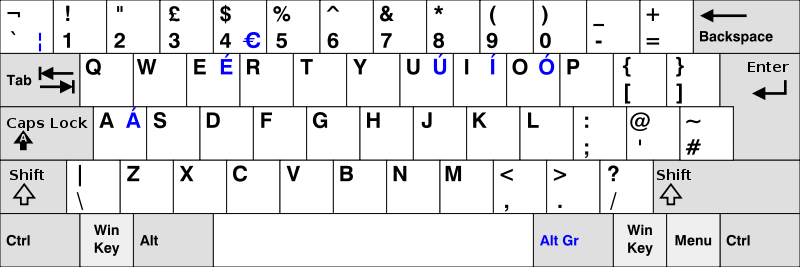
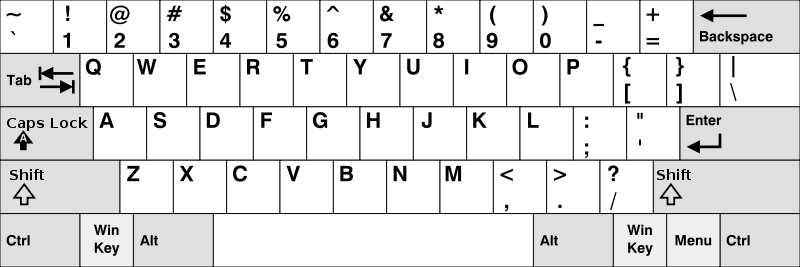
You've somehow managed to have a US desktop/laptop keyboard with a UK settings OR vice versa, but what's the difference in keyboard layouts? The major difference you'll probably notice first when typing are the @ and " keys beings swapped, and the US keyboard layout has a second Alt key instead of the UK AltGr key 1 "
The United Kingdom and Ireland use a keyboard layout based on the 48-key version defined in British Standard BS 4822. It is very similar to that of the United States, but has an extra key and a larger Enter key, includes £ and € signs and some rarely used EBCDIC symbols (¬, ¦), and uses different positions for the characters @, ", #, ~, \, and |." 2
UK layout:
US layout:
How do you then type the pound, euro and other symbols without the native US layout keys when you need them?
Press the Alt key while typing the numbers below to make the special characters:
Alt 0163 or Alt 156 £ Pound sterling
Alt 0128 € Euro currency symbol
When you get the UK keyboard and you need to contribute your 2 cents instead of pence:
Alt 0162 or Alt 155 ¢ Cent
You can use the Windows Character Map included with Windows or a helpful guide such as the table at http://www.forlang.wsu.edu/help/keyboards.asp.
This is only a brief overview for what PC users should expect and does not cover mobile devices. You could search Google for your device or operating system and the characters you wish to type, sometimes you may need to install a third-party keyboard app. Any further tips you'd like to share in the comments below?
You might also like:

| Attachment | Size |
|---|---|
 UK Keyboard Layout UK Keyboard Layout | 38.69 KB |
| US Keyboard Layout | 35.97 KB |
Filed In:

Comments
You should be able to go into